
Using ForeverCast
Fishing settings
Open Settings with the gear icon. The defaults work for most people; the only things you must set are your Cast Key and Interact Key. Click Save Settings at the bottom when you're done.
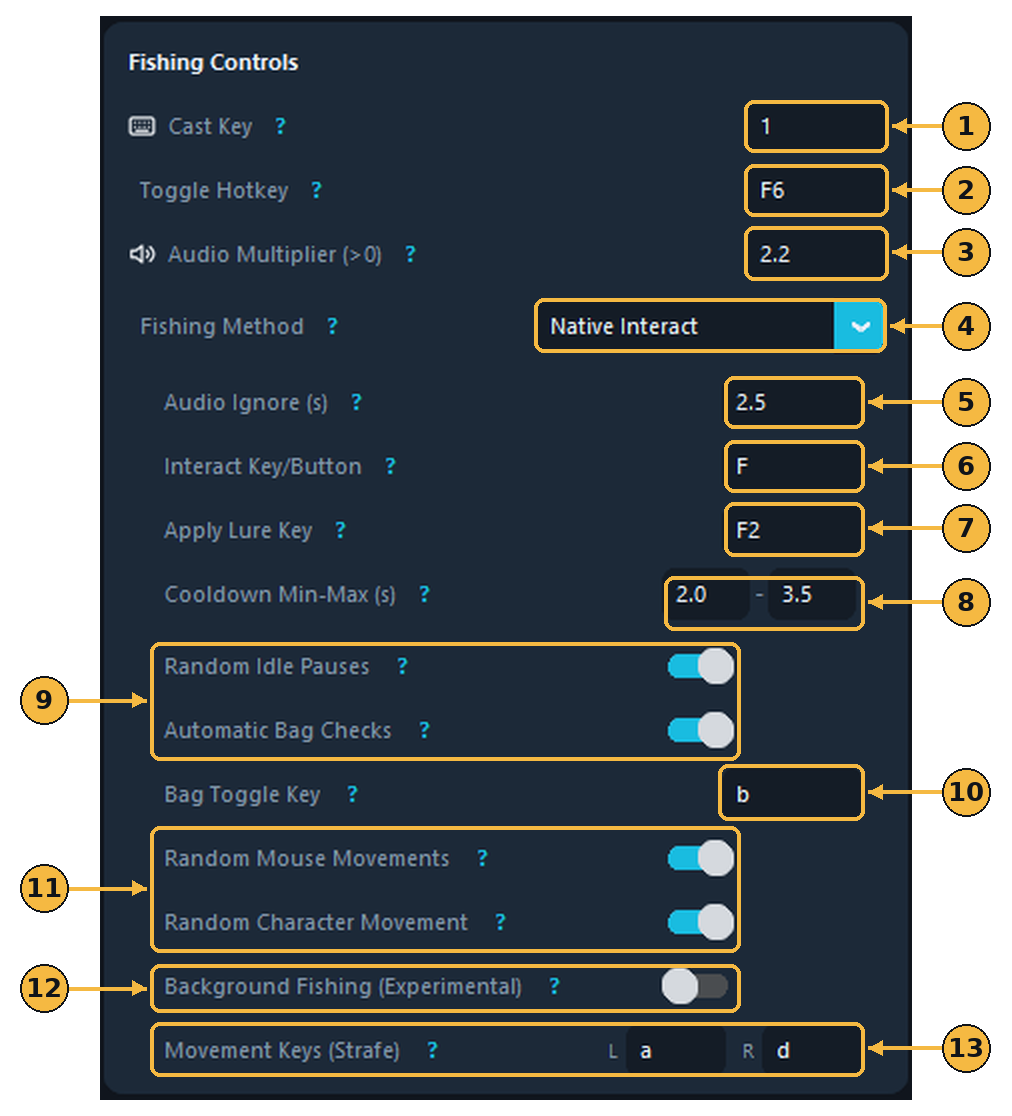
- Cast KeyThe action bar key your Fishing spell is on. Default 1.
- Toggle HotkeyStarts and stops fishing from anywhere, even while WoW is in front. Default F6; any of F1–F12 works.
- Audio MultiplierHow loud a sound must be to count as a splash. Lower = more sensitive. Default
2.2. If it misses bites, lower it a little (try 1.8). If it loots before a fish bites, raise it (try 2.6). - Fishing MethodNative Interact (recommended) listens and loots with Interact With Target. Cursor Scan looks for the bobber in a screen area you draw. See Quick Setup Guide.
- Audio Ignore (s)Sounds are ignored for this many seconds after each cast, so the cast itself isn't mistaken for a bite. Default
2.5. - Interact Key/ButtonThe key bound to Interact With Target in WoW. Must be different from the Cast Key. Can be a keyboard key or a side mouse button (Mouse 4, Mouse 5), except in Background Fishing, which needs a keyboard key.
- Apply Lure KeyThe key bound to Apply Lure (Keybindings → Other) in WoW. Leave it empty to never apply lures.
- Cooldown Min–Max (s)A random wait between looting and casting again. Default 2.0–3.5 seconds, so no two casts are timed exactly the same.
- Random Idle Pauses / Automatic Bag ChecksIdle pauses: after every 15–25 catches, stop for 30–90 seconds, then carry on by itself. Bag checks: now and then, open and close your bags between casts.
- Bag Toggle KeyYour WoW key for opening all bags, used by bag checks. Default B.
- Random Mouse / Character MovementMouse: nudges the cursor a little between casts while you're not using the PC. Character: tiny strafe taps left and right between casts.
- Background Fishing (Experimental)Keep fishing when WoW isn't the active window. Read Background Fishing before turning this on.
- Movement Keys (Strafe)Your WoW strafe-left and strafe-right keys, used by Random Character Movement. Default A and D.
Recommended starting point
| Setting | Value | Why |
|---|---|---|
| Fishing Method | Native Interact | No calibration, works at any camera angle |
| Audio Multiplier | 2.2 | Adjust by 0.2 at a time if needed |
| Cooldown | 2.0 – 3.5 | Looks natural without wasting time |
| Human-like options | All on | Breaks up the rhythm of long sessions |
| Session limit | Catch or time limit on | Nobody fishes 14 hours straight |
No duplicate keys
Each key field must use its own key. If two settings share a key, one of them presses the wrong thing in WoW.
Clicking a key field
Click any key field and press the key you want; it records it for you. You don't need to type its name.