
Using ForeverCast
Session limits & auto logout
Tell ForeverCast when to stop: after a number of hours, a number of fish, or whichever comes first. It can then log your character out or close WoW.
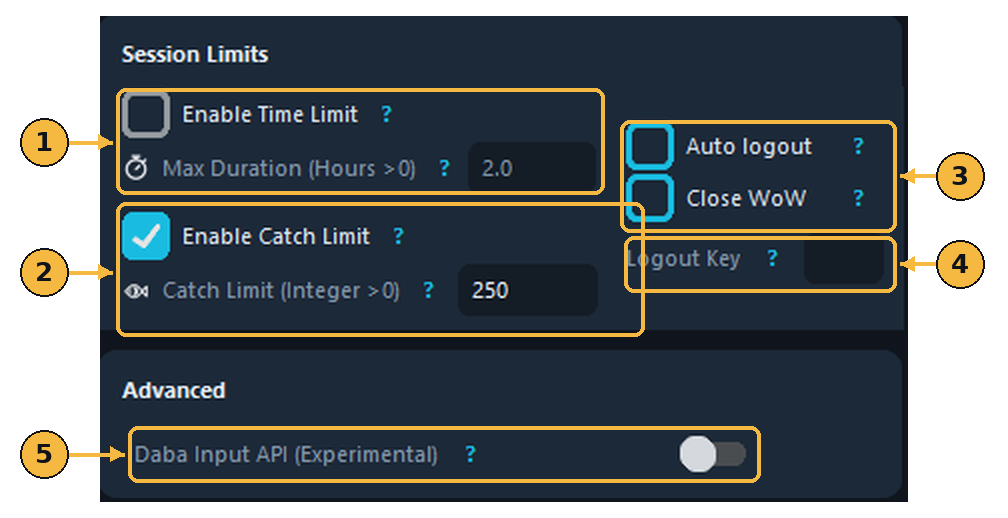
- Time limitTick Enable Time Limit and set Max Duration in hours (e.g.
2.0). It counts time spent actively fishing. - Catch limitTick Enable Catch Limit and set how many catches (e.g.
250). The main window shows progress as0 / 250. With both limits on, whichever is reached first stops the session. - Auto logout / Close WoWWhat happens when a limit is reached. Pick one or neither, not both.
Auto logout presses your Logout Key once, so your/logoutmacro logs the character out.
Close WoW closes the WoW window that was fishing, the same as clicking its X. It works even if another window is in front, and only closes that one WoW window. - Logout KeyThe keyboard key your
/logoutmacro is on. See Set up WoW → Logout macro. - Daba Input API (Experimental)Sends keys through the Daba app instead of Windows' own input. Only turn this on if you already use Daba and it's running; ForeverCast detects it by itself.
When auto logout and Close WoW do not run
Only when a time or catch limit is reached. They never run when you stop with F6, when an error stops fishing, or when a safety stop kicks in. If WoW is minimized at that moment, the logout key isn't sent, and you'll see "Logout key NOT sent: WoW is minimized." in the log.