
v1.1.0 · Windows 10/11 · WoW Forever
Set your keys, press F6, go do something else.
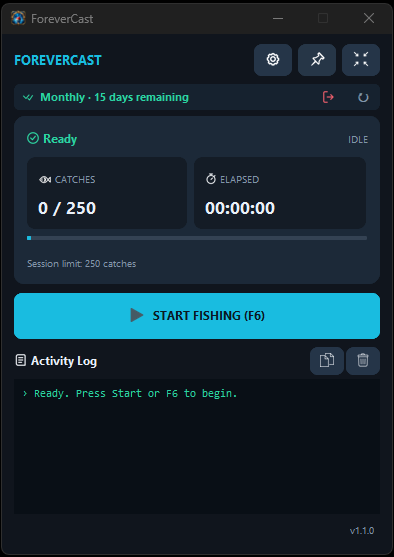
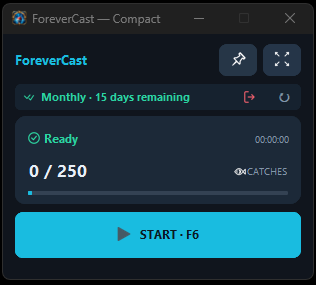
ForeverCast fishes for you in WoW Forever. It listens to WoW's own audio for the bobber splash, so your camera angle, the water colour and your UI scale make no difference.
- Key delivered seconds after paying
- Updates itself
- Support through Discord tickets
How a cast works
It doesn't look for the bobber. It listens for it.
Most fishing bots scan the screen for the bobber and lose it the moment the light changes. ForeverCast captures audio from the WoW process only (your music and Discord calls are ignored) and waits for the splash.
- 01Cast
Presses your cast key, the one you put Fishing on in your action bar.
- 02Wait
The cast sound is ignored for a moment so it isn't mistaken for a bite.
- 03Splash
A sound loud enough to cross your threshold means a fish is on the line.
- 04Loot
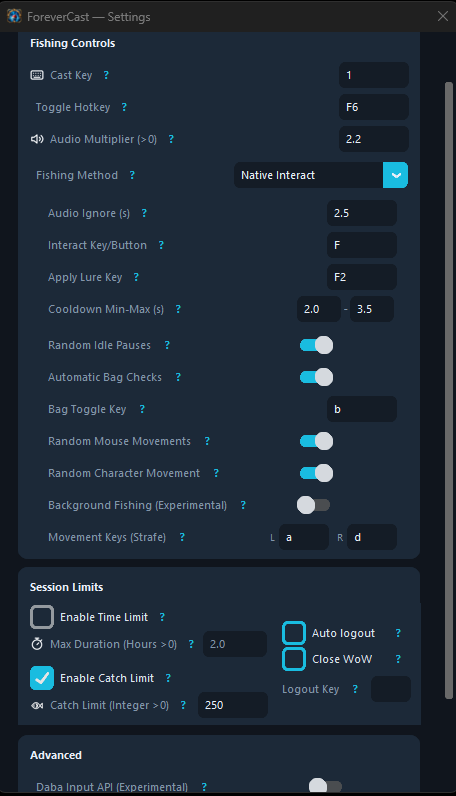
Presses your Interact With Target key, waits a random 2–3.5 s, then casts again.
What's in it
Everything we kept adding after people asked for it
Background Fishing Experimental
Keep fishing while WoW sits behind your browser or Discord. Off by default, and you have to confirm twice before it turns on, because sending keys to a background window carries more risk.
Lures put on for you
The installer adds the FCBeacon addon to WoW. When your lure runs out, ForeverCast applies the best one you have in your bags, Camper's Lure included.
Stop after X hours or Y fish
Set a time or catch limit. When it's reached, ForeverCast can log your character out with your /logout macro or close WoW for you.
Shallow water? Recast.
If WoW says the water is too shallow, it recasts in about 3 seconds instead of waiting half a minute for a bite that won't come.
Doesn't fish like a metronome
Random pauses between casts, short breaks every 15–25 catches, the odd bag check, small mouse nudges and strafe taps. Each one can be turned off.
Two WoW windows open
Pick which client to fish on. Audio and key presses go to that window, not whichever one is in front.
Safe stops
Five casts in a row with no splash and it stops by itself, and it never sends keys if WoW is minimized or closed.
Updates itself
New versions are signed and installed from inside the app. You don't have to download anything again from Discord.
Setup
Five minutes of keybinds, then you're done
The Quick Setup Guide opens the first time you start it. You'll need:
- Fishing on an action bar slot. That key is your Cast Key.
- A key for "Interact With Target" in WoW's keybindings.
- WoW sound on. It listens to the game, so the game has to make noise.
- Optional: an Apply Lure key for the addon, and a
/logoutmacro for auto logout.
Pricing
Two options, no subscription
One payment, no automatic renewal. A key works on one PC at a time.
Monthly
30 days, starting when you activate the key
- Every feature, including Background Fishing
- Buy again before it ends and 30 days are added
- Upgrade to Lifetime later from your account
- Member wiki and Discord support
Lifetime Best value
Pay once, keep it
- Every feature, including Background Fishing
- All future updates
- Never expires
- Member wiki and Discord support
You'll log in with Discord first, so we know where to send your key. It shows up on your account page and in your Discord DMs as soon as the payment goes through.
Converted prices are estimates based on today's exchange rate. You're charged €9.99 / €39.99 or the equivalent in your currency at checkout.
Already on Monthly? Upgrading costs €30 if you have more than 20 days left, otherwise the full €39.99.
FAQ
Questions people actually ask
Can I get banned for using this?
Yes, it's possible. Any third-party automation is against the game's rules, and no bot can promise you won't be caught. ForeverCast adds random timing and small human-like actions, but you use it at your own risk. Background Fishing carries more risk than the standard mode, which is why it's off by default.
Which game client does it work with?
It's built and tested for the WoW Forever client on Windows 10 and 11. A macOS version is in progress but not available yet.
Does WoW need to be the active window?
In the standard mode, yes. With Background Fishing turned on, WoW can sit behind other windows. It just can't be minimized.
When does my Monthly key start counting down?
When you activate it in the app for the first time, not when you buy it. You get the full 30 days.
Can I use one key on two PCs?
One PC at a time. If you switch PCs, press Reset Device in the activation window and activate on the new one. You can do this once every 30 minutes.
How do I get my key?
Log in with Discord, choose a plan and pay. The key appears on your account page and is sent to you as a Discord DM, usually within a few seconds.
Can I get a refund?
Please read the refund policy before buying. If something doesn't work on your PC, open a ticket in Discord first. Most problems are a keybind or a sound setting.