
Before you start
Install & activate
Download the installer, let it add the FCBeacon addon to WoW, then paste your key into the activation window.
1. Download and install
- Download the installerUse the Download the installer link on your account page. You get a file called
ForeverCast-Setup-vX.X.X.exe, where X.X.X is the latest version. - Run itIf Windows SmartScreen shows "Windows protected your PC", click More info → Run anyway. This appears for most small apps that aren't from a big publisher.
- Leave "Install FCBeacon addon to World of Warcraft" tickedThe installer looks for your WoW folder (the one that contains
_forever_) on every drive. If it can't find it, it asks you to point to it. FCBeacon is what lets ForeverCast put lures on for you. - Finish and launch ForeverCastThe activation window opens the first time.
The installer couldn't find WoW?
It puts a folder called ForeverCast - FCBeacon Addon on your Desktop instead. Copy the FCBeacon folder inside it into World of Warcraft\_forever_\Interface\AddOns\. There's a READ ME.txt in that folder with the same steps.
2. Activate your key
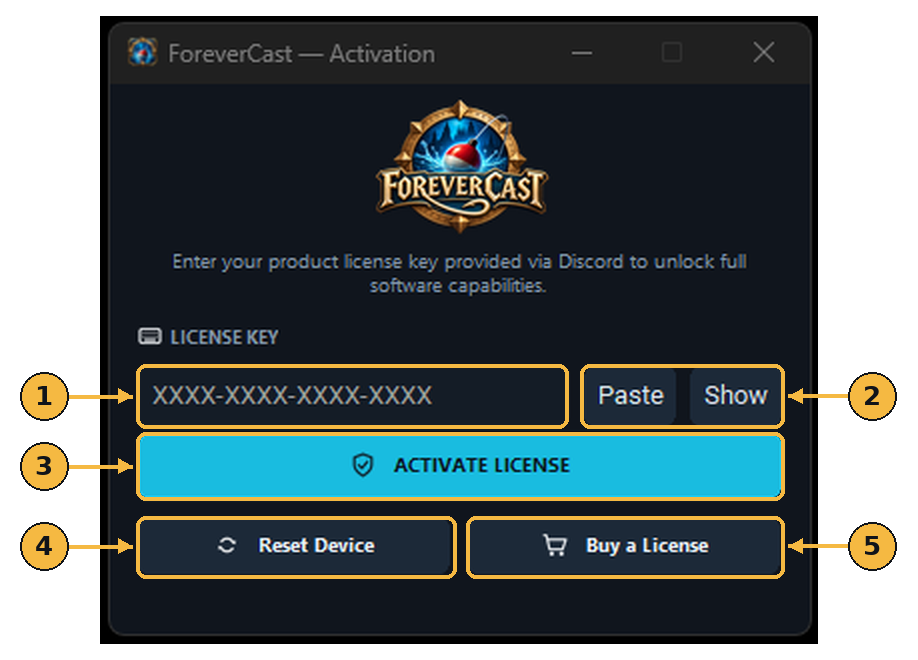
- License keyYour key looks like
XXXX-XXXX-XXXX-XXXX. Copy it from your account page or from the DM our bot sent you. - Paste / ShowPaste fills in whatever is on your clipboard. Show reveals the key so you can check it for typos.
- Activate LicenseLocks the key to this PC and opens ForeverCast. For a Monthly key, this is when your 30 days start.
- Reset DeviceUse this when you move to another PC. It unlinks the key from the old PC so you can activate it on the new one. You can reset once every 30 minutes.
- Buy a LicenseTakes you to the store if you don't have a key yet.
One PC per key
If you activate on a second PC without resetting, the first one stops working. Sharing a key gets it revoked.
3. Next
Before you press Start, set up the keybinds in WoW. That's the next page.